
Analyzing list / item-count experiments (list)

Follow the analysis.
Select a node to explore the method
Load the list package and race data
Data preparation — shapes the raw inputs into what the estimator expects.
Load the list package and the 1991 National Race and Politics Survey list experiment on racial attitudes.
# Install:  install.packages("list")
library(list)
data(race)
set.seed(1)

Before using this step, make its assumptions and its output explicit. A useful peer note explains what you would check, what could go wrong, or what would change your interpretation.
Questions to explore- Which assumption matters most here, and what evidence could challenge it?
- What would you check before passing this output to the next step?
Choose a question to start your comment.
Peer discussion
- Bring your experience, a question, or a different perspective.
Log in to comment on this step.
Difference-in-means prevalence
A pre-flight check — run this before trusting any estimate downstream.
Fit an intercept-only ictreg with method='lm' to recover the basic difference-in-means estimate of the sensitive-item prevalence.
diff.in.means <- ictreg(y ~ 1, data = race, treat = "treat",
                        J = 3, method = "lm")
summary(diff.in.means)
Before using this step, make its assumptions and its output explicit. A useful peer note explains what you would check, what could go wrong, or what would change your interpretation.
Questions to explore- Which assumption matters most here, and what evidence could challenge it?
- What would you check before passing this output to the next step?
Choose a question to start your comment.
Peer discussion
- Bring your experience, a question, or a different perspective.
Log in to comment on this step.
Multivariate ML regression
The core estimate — where the causal quantity itself is computed.
Fit the constrained maximum-likelihood model relating covariates to the latent sensitive-item response (Imai 2011, Table 1).
ml.results <- ictreg(y ~ south + age + male + college,
                     data = race, treat = "treat", J = 3,
                     method = "ml", constrained = TRUE)
summary(ml.results)
Before using this step, make its assumptions and its output explicit. A useful peer note explains what you would check, what could go wrong, or what would change your interpretation.
Questions to explore- Which assumption matters most here, and what evidence could challenge it?
- What would you check before passing this output to the next step?
Choose a question to start your comment.
Peer discussion
- Bring your experience, a question, or a different perspective.
Log in to comment on this step.
Predict sensitive-item prevalence
Reporting — turn the numbers into a figure or table a reader can act on.
Use predict() to obtain the model-based estimated proportion holding the sensitive view, with uncertainty.
predict(ml.results, newdata = race, avg = TRUE,
        interval = "confidence", se.fit = TRUE)
Before using this step, make its assumptions and its output explicit. A useful peer note explains what you would check, what could go wrong, or what would change your interpretation.
Questions to explore- Which assumption matters most here, and what evidence could challenge it?
- What would you check before passing this output to the next step?
Choose a question to start your comment.
Peer discussion
- Bring your experience, a question, or a different perspective.
Log in to comment on this step.
Inputs & data
Survey data with the respondent's count response, a treatment/control indicator, and covariates.
Show data format & exampleHide example
| id | treat | count | age | educ |
|---|---|---|---|---|
| 1 | 1 | 3 | 40 | 2 |
| 2 | 0 | 2 | 55 | 3 |
| 3 | 1 | 2 | 31 | 1 |
| 4 | 0 | 1 | 62 | 2 |
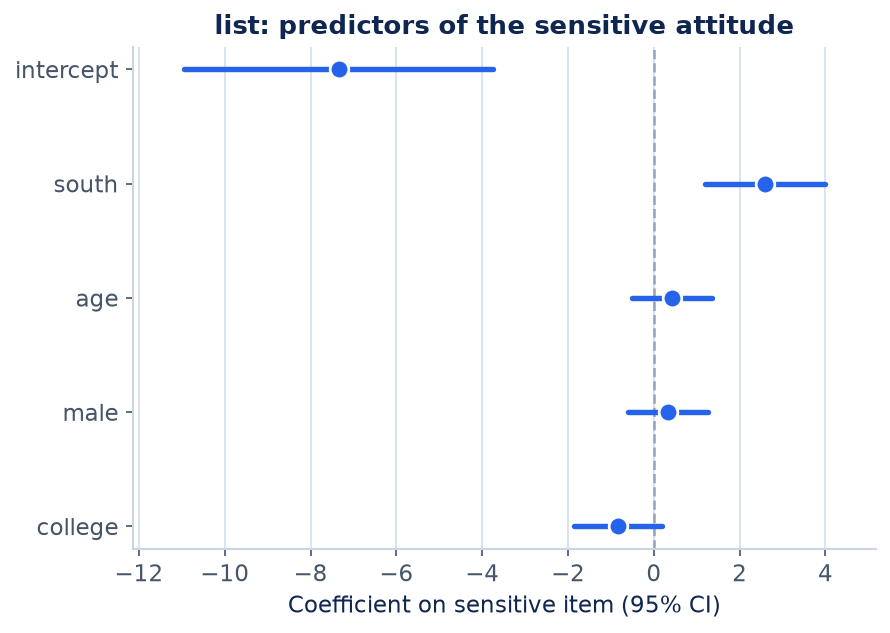
Result figure rendered by StatsOtter from the package's documented example — unofficial community showcase; all credit to the original authors.
The estimate
\hat\pi=\bar Y_{\text{treat}}-\bar Y_{\text{control}}
⚠️ Unofficial community showcase of list (docs). Not affiliated with the authors — all credit to Kosuke Imai & coauthors; this summarizes public documentation.
What it does: list implements the Blair-Imai statistical toolkit for list experiments (a.k.a. the item-count technique), a survey design that elicits truthful answers to sensitive questions—prejudice, corruption, illegal behavior—by hiding the sensitive item among innocuous ones. How it works: respondents are randomized to a control list or a treatment list that adds the sensitive item, and report only how many items apply, preserving privacy. The package's ictreg() fits maximum-likelihood and Bayesian/EM multivariate regressions that model the probability of holding the sensitive trait as a function of covariates, with estimators for standard, multiple-sensitive-item, and design-effect cases. Assumptions: identification relies on no design effect (adding the sensitive item doesn't change responses to control items) and no liars (truthful answering under the protected format). The package supplies diagnostic tests for these assumptions and methods to combine list experiments with direct or endorsement questions.
What you get — Estimated population prevalence of the sensitive trait and regression coefficients linking covariates to it, with standard errors/credible intervals.
Example output
Item Count Technique Regression

Call: ictreg(formula = y ~ south + age + male + college, data = race,
    treat = "treat", J = 3, method = "ml", constrained = TRUE)

Sensitive item
            Est. S.E.
(Intercept) -7.343 1.837
south        2.580 0.713
age          0.422 0.474
male         0.328 0.477
college     -0.831 0.522

Control items
            Est. S.E.
(Intercept)  0.700 0.111
south        0.310 0.072
age          0.181 0.030

Log-likelihood: -1947.085
Discuss the workflow (0)
Log in to join the discussion.