

Follow the analysis.
Select a node to explore the method
Load cem and the LeLonde data
Data preparation — shapes the raw inputs into what the estimator expects.
Load the package and the LL (LeLonde) dataset, and define the variables to drop from matching.
# Install:  install.packages("cem")
library(cem)
data(LL)
todrop <- c("treated", "re78")

Before using this step, make its assumptions and its output explicit. A useful peer note explains what you would check, what could go wrong, or what would change your interpretation.
Questions to explore- Which assumption matters most here, and what evidence could challenge it?
- What would you check before passing this output to the next step?
Choose a question to start your comment.
Peer discussion
- Bring your experience, a question, or a different perspective.
Log in to comment on this step.
Measure imbalance before matching
A pre-flight check — run this before trusting any estimate downstream.
Compute the multivariate L1 imbalance and per-variable differences on the raw data.
imbalance(group = LL$treated, data = LL, drop = todrop)
Before using this step, make its assumptions and its output explicit. A useful peer note explains what you would check, what could go wrong, or what would change your interpretation.
Questions to explore- Which assumption matters most here, and what evidence could challenge it?
- What would you check before passing this output to the next step?
Choose a question to start your comment.
Peer discussion
- Bring your experience, a question, or a different perspective.
Log in to comment on this step.
Coarsen and match with cem()
The core estimate — where the causal quantity itself is computed.
Run coarsened exact matching with automatic binning, dropping the outcome from the coarsening.
mat <- cem(treatment = "treated", data = LL, drop = "re78")
mat
Before using this step, make its assumptions and its output explicit. A useful peer note explains what you would check, what could go wrong, or what would change your interpretation.
Questions to explore- Which assumption matters most here, and what evidence could challenge it?
- What would you check before passing this output to the next step?
Choose a question to start your comment.
Peer discussion
- Bring your experience, a question, or a different perspective.
Log in to comment on this step.
Check imbalance after matching
A pre-flight check — run this before trusting any estimate downstream.
Re-evaluate the L1 statistic on the matched, weighted sample to confirm balance improved.
mat$imbalance
Before using this step, make its assumptions and its output explicit. A useful peer note explains what you would check, what could go wrong, or what would change your interpretation.
Questions to explore- Which assumption matters most here, and what evidence could challenge it?
- What would you check before passing this output to the next step?
Choose a question to start your comment.
Peer discussion
- Bring your experience, a question, or a different perspective.
Log in to comment on this step.
Estimate the SATT
Uncertainty quantification — standard errors, intervals, and aggregation.
Use att() to estimate the sample average treatment effect on the treated within CEM strata.
est <- att(mat, re78 ~ treated, data = LL)
est
Before using this step, make its assumptions and its output explicit. A useful peer note explains what you would check, what could go wrong, or what would change your interpretation.
Questions to explore- Which assumption matters most here, and what evidence could challenge it?
- What would you check before passing this output to the next step?
Choose a question to start your comment.
Peer discussion
- Bring your experience, a question, or a different perspective.
Log in to comment on this step.
Inputs & data
A data frame with a treatment indicator and covariates, plus optional coarsening (cutpoints/groupings) per covariate.
Show data format & exampleHide example
| treated | age | sex | income |
|---|---|---|---|
| 1 | 34 | F | 52000 |
| 0 | 31 | F | 48000 |
| 1 | 60 | M | 75000 |
| 0 | 58 | M | 71000 |
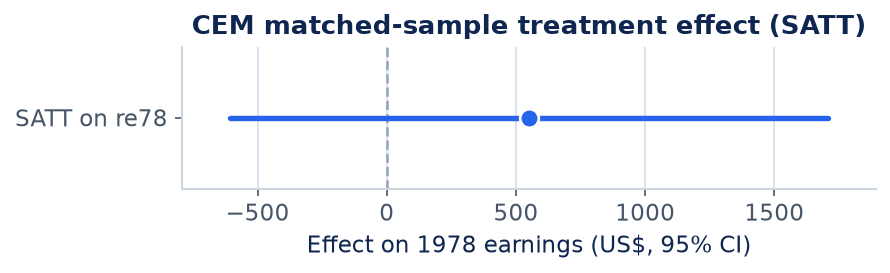
Result figure rendered by StatsOtter from the package's documented example — unofficial community showcase; all credit to the original authors.
The estimate
\hat\tau=\sum_{\ell\in\mathcal L}\frac{n_\ell^{T}}{n^{T}}\big(\bar Y_\ell^{T}-\bar Y_\ell^{C}\big)
⚠️ Unofficial community showcase of cem (docs). Not affiliated with the authors — all credit to Gary King & coauthors; this summarizes public documentation.
What it does: CEM implements Coarsened Exact Matching, a monotonic-imbalance-bounding matching method that improves covariate balance between treated and control groups in observational studies. How it works: Each covariate is temporarily coarsened into substantively meaningful bins (e.g. age into decades), units are sorted into strata defined by all coarsened covariates, and only strata containing both treated and control units are retained. The original (uncoarsened) values are then used for analysis, with weights correcting for differing stratum sizes. Bounding imbalance on one variable never increases it on another (MIB property), and the user directly controls the balance/sample-size tradeoff via the coarsening. Assumptions: Unconfoundedness given observed covariates and common support; pruned units reduce the sample but improve balance. Output: matched strata, CEM weights, an imbalance measure, and effect estimates (commonly the ATT) on the matched sample.
What you get — Matched strata with CEM weights and an imbalance statistic, used to estimate treatment effects (e.g. ATT).
Example output
G0      G1
429     185
Matched Data
G0      G1
222     163

Linear regression model on CEM matched data:

SATT point estimate: 550.625110 (p.value=0.347096)
95% conf. interval: [-606.207019, 1707.457238]

Multivariate L1 distance after matching: 0.59

Number of strata: 162
Number of matched strata: 67

          G0  G1
All      429 185
Matched  222 163
Unmatched 207  22
Discuss the workflow (0)
Log in to join the discussion.