
Matching for causal inference (MatchIt)

@misc{matchit,
  title        = {MatchIt},
  author       = {Ho and Imai and King and Stuart},
  howpublished = {\url{https://kosukeimai.github.io/MatchIt/}},
  note         = {Software / documentation}
}Follow the analysis.
Select a node to explore the method
Treatment W + covariates X
Data preparation — shapes the raw inputs into what the estimator expects.
Binary treatment plus the covariates to match on.
data("lalonde", package = "MatchIt")

Before using this step, make its assumptions and its output explicit. A useful peer note explains what you would check, what could go wrong, or what would change your interpretation.
Questions to explore- Which assumption matters most here, and what evidence could challenge it?
- What would you check before passing this output to the next step?
Choose a question to start your comment.
Peer discussion
- Bring your experience, a question, or a different perspective.
Log in to comment on this step.
[MatchIt] Matching for causal inference — matchit()
The core estimate — where the causal quantity itself is computed.
Nearest-neighbor matching on the estimated propensity score.
Matching for causal inference — matchit() — Nearest-neighbor, optimal, full, and genetic matching to preprocess data so treated and control groups are comparable before estimating effects.
m <- matchit(treat ~ age + educ + race + re74 + re75, lalonde, method = "nearest")
Before using this step, make its assumptions and its output explicit. A useful peer note explains what you would check, what could go wrong, or what would change your interpretation.
Questions to explore- Which assumption matters most here, and what evidence could challenge it?
- What would you check before passing this output to the next step?
Choose a question to start your comment.
Peer discussion
- Bring your experience, a question, or a different perspective.
Log in to comment on this step.
Assess balance (summary / plot)
A pre-flight check — run this before trusting any estimate downstream.
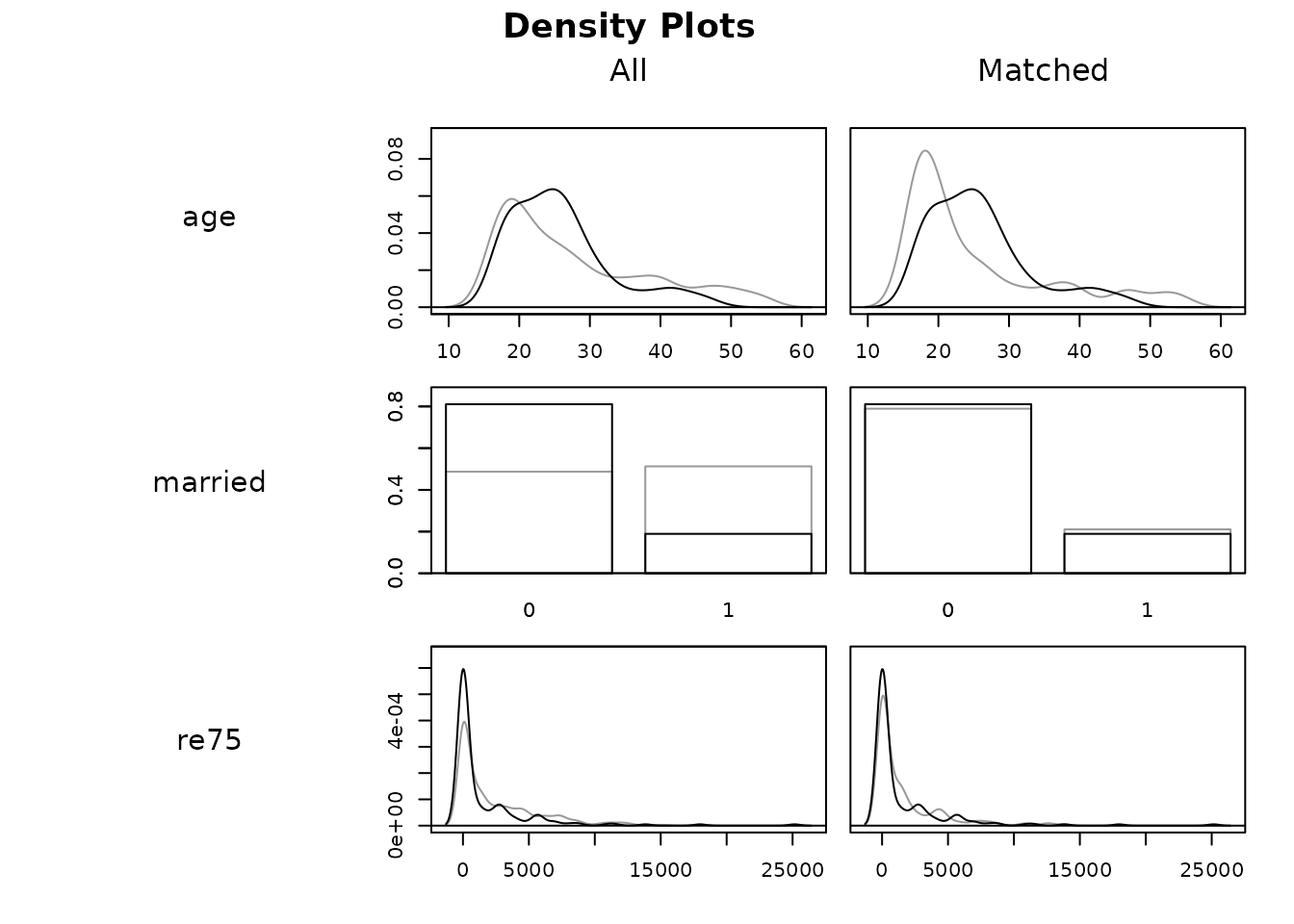
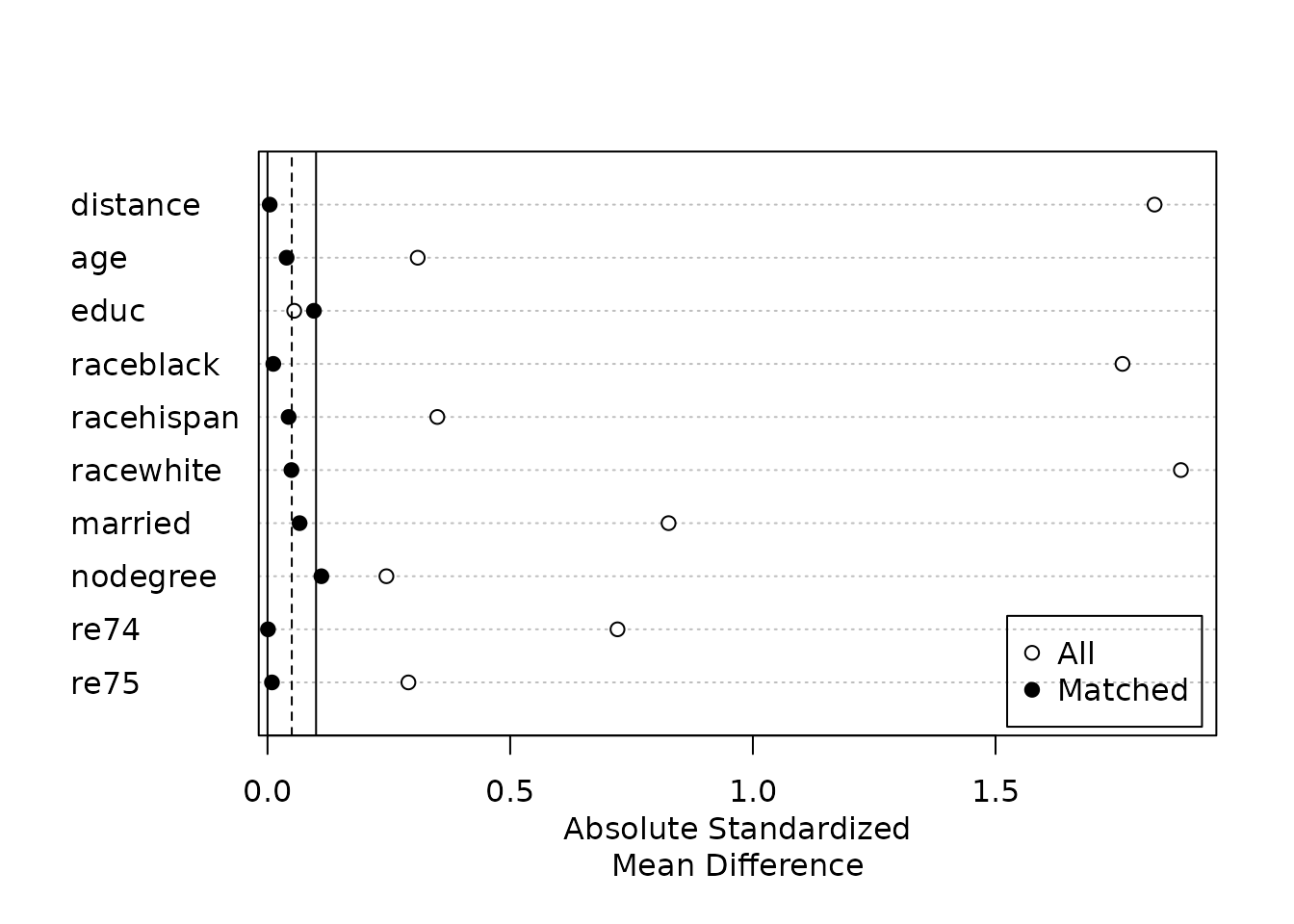
Check standardized mean differences and eCDF/QQ plots on the matched sample.
summary(m); plot(m, type = "jitter")
Before using this step, make its assumptions and its output explicit. A useful peer note explains what you would check, what could go wrong, or what would change your interpretation.
Questions to explore- Which assumption matters most here, and what evidence could challenge it?
- What would you check before passing this output to the next step?
Choose a question to start your comment.
Peer discussion
- Bring your experience, a question, or a different perspective.
Log in to comment on this step.
Estimate the effect on matched data
Reporting — turn the numbers into a figure or table a reader can act on.
Fit the outcome model on match.data() with cluster-robust SEs.
fit <- lm(re78 ~ treat, data = match.data(m), weights = weights)
Before using this step, make its assumptions and its output explicit. A useful peer note explains what you would check, what could go wrong, or what would change your interpretation.
Questions to explore- Which assumption matters most here, and what evidence could challenge it?
- What would you check before passing this output to the next step?
Choose a question to start your comment.
Peer discussion
- Bring your experience, a question, or a different perspective.
Log in to comment on this step.
Inputs & data
A binary treatment and the covariates to match on (Lalonde job-training data).
Show data format & exampleHide example
Format — one row per unit: treatment W ∈ {0,1} and covariates X.
  W  age educ   race   re74  re75
  1   37   11  black     0     0
  0   30   12  white  4100  3800

Figures reproduced from MatchIt — Ho, Imai, King & Stuart — unofficial community showcase; all credit to the original authors.
The estimate
\hat\tau_{\mathrm{ATT}}=\frac{1}{n_1}\sum_{i:\,Z_i=1}\Big(Y_i-\sum_{j} w_{ij}\,Y_j\Big)
The MatchIt vignette (Lalonde). Match, assess balance, and only then estimate. Unofficial summary.
Discuss the workflow (2)
Log in to join the discussion.
Matching as the design stage — outcome-free — is the discipline people skip. MatchIt makes it the path of least resistance.
And match.data() → any outcome model. Pairs perfectly with cobalt for the balance plots.
Nearest, optimal, full, genetic — all behind one matchit() call. Great teaching tool.