

Follow the analysis.
Select a node to explore the method
Load data and specify the PS model
Data preparation — shapes the raw inputs into what the estimator expects.
Load the bundled psdata (3-level treatment trt with covariates cov1-cov6 and outcome Y) and write the propensity-score formula that all later steps reuse.
# Install:  install.packages("PSweight")
library(PSweight)
data("psdata")
head(psdata)

ps.formula  <- trt ~ cov1 + cov2 + cov3 + cov4 + cov5 + cov6
out.formula <- Y   ~ cov1 + cov2 + cov3 + cov4 + cov5 + cov6

Before using this step, make its assumptions and its output explicit. A useful peer note explains what you would check, what could go wrong, or what would change your interpretation.
Questions to explore- Which assumption matters most here, and what evidence could challenge it?
- What would you check before passing this output to the next step?
Choose a question to start your comment.
Peer discussion
- Bring your experience, a question, or a different perspective.
Log in to comment on this step.
Design stage: SumStat() balance check
A pre-flight check — run this before trusting any estimate downstream.
Fit the PS model and compute weighted covariate balance under several weighting schemes before touching the outcome, so the design is finalized blind to Y.
bal <- SumStat(ps.formula, trtgrp = "2", data = psdata,
               weight = c("IPW", "overlap", "treated", "entropy", "matching"))

summary(bal)
plot(bal, type = "balance", metric = "ASD")
Before using this step, make its assumptions and its output explicit. A useful peer note explains what you would check, what could go wrong, or what would change your interpretation.
Questions to explore- Which assumption matters most here, and what evidence could challenge it?
- What would you check before passing this output to the next step?
Choose a question to start your comment.
Peer discussion
- Bring your experience, a question, or a different perspective.
Log in to comment on this step.
Estimate the ATO with overlap weights
The core estimate — where the causal quantity itself is computed.
Call PSweight with weight='overlap' to estimate the average treatment effect among the overlap population using closed-form sandwich variance.
ato1 <- PSweight(ps.formula = ps.formula, yname = "Y",
                 data = psdata, weight = "overlap")
Before using this step, make its assumptions and its output explicit. A useful peer note explains what you would check, what could go wrong, or what would change your interpretation.
Questions to explore- Which assumption matters most here, and what evidence could challenge it?
- What would you check before passing this output to the next step?
Choose a question to start your comment.
Peer discussion
- Bring your experience, a question, or a different perspective.
Log in to comment on this step.
Summarize pairwise contrasts
Uncertainty quantification — standard errors, intervals, and aggregation.
summary() forms the default pairwise contrasts across the three treatment levels and reports point estimates, sandwich SEs, Wald CIs, and p-values.
summary(ato1)
Before using this step, make its assumptions and its output explicit. A useful peer note explains what you would check, what could go wrong, or what would change your interpretation.
Questions to explore- Which assumption matters most here, and what evidence could challenge it?
- What would you check before passing this output to the next step?
Choose a question to start your comment.
Peer discussion
- Bring your experience, a question, or a different perspective.
Log in to comment on this step.
Inputs & data
One row per unit: covariates X, a (binary or multi-level) treatment Z, and an outcome Y.
Show data format & exampleHide example
| trt | cov1 | cov2 | cov3 | Y |
|---|---|---|---|---|
| 1 | 0.42 | 1 | -0.7 | 8.1 |
| 2 | -1.1 | 0 | 0.3 | 5.6 |
| 1 | 0.05 | 1 | 1.2 | 9.4 |
| 3 | 1.30 | 0 | -0.2 | 4.2 |
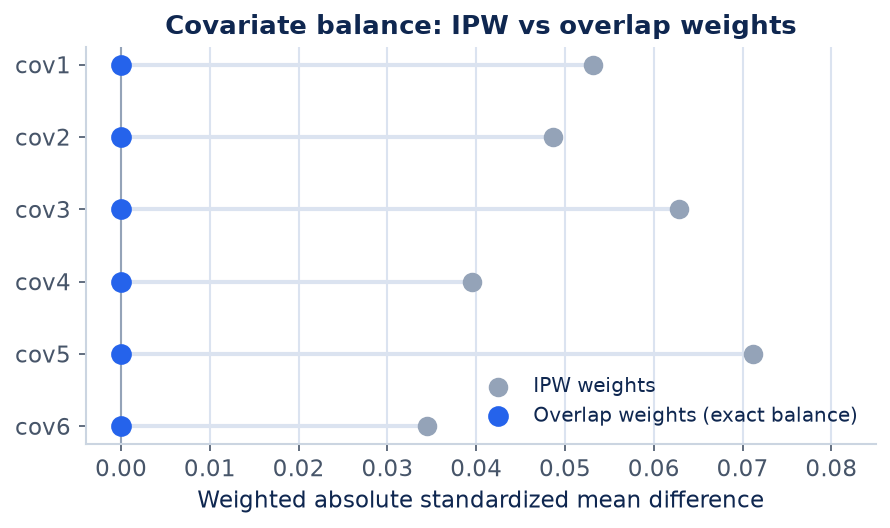
Result figure rendered by StatsOtter from the package's documented example — unofficial community showcase; all credit to the original authors.
The estimate
\hat\tau_{\mathrm{ATO}}=\frac{\sum_i w_i Z_i Y_i}{\sum_i w_i Z_i}-\frac{\sum_i w_i(1-Z_i)Y_i}{\sum_i w_i(1-Z_i)},\quad w_i=\begin{cases}1-e_i & Z_i=1\ e_i & Z_i=0\end{cases}
⚠️ Unofficial community showcase of PSweight (docs). Not affiliated with the authors — all credit to Fan Li & coauthors; this summarizes public documentation.
What it does. PSweight estimates average causal effects from observational studies and trials using propensity-score balancing weights. It supports the overlap weight (ATO), IPW (ATE), treated weight (ATT), matching and entropy weights, for binary and multi-category treatments, with additive and ratio (risk ratio, odds ratio) estimands.
How it works. A SumStat design step fits the propensity model and reports weighted covariate balance and PS-overlap diagnostics. The PSweight analysis step computes weighted average potential outcomes and contrasts, optionally augmented (doubly robust) with an outcome model, using nuisance-adjusted sandwich (or bootstrap) standard errors. Overlap weights uniquely yield exact mean balance on covariates included in a logistic PS and minimize asymptotic variance.
Assumptions. Unconfoundedness, positivity/overlap (relaxed by ATO down-weighting extremes), correct PS model (or outcome model under augmentation), SUTVA.
What you get — Point estimate of the chosen contrast (e.g. ATO), sandwich SE, confidence interval, plus weighted balance tables and PS-overlap plots.
Example output
Closed-form inference:

Original group value:  1, 2, 3

Contrast:
            1  2 3
Contrast 1 -1  1 0
Contrast 2 -1  0 1
Contrast 3  0 -1 1

           Estimate Std.Error      lwr      upr  Pr(>|z|)
Contrast 1 -1.24161   0.16734 -1.56960 -0.91362 1.177e-13 ***
Contrast 2  1.12482   0.17099  0.78968  1.45996 4.764e-11 ***
Contrast 3  2.36643   0.25854  1.85970  2.87315 < 2.2e-16 ***
---
Signif. codes:  0 '***' 0.001 '**' 0.01 '*' 0.05 '.' 0.1 ' ' 1
Discuss the workflow (0)
Log in to join the discussion.