
The balance–sample-size frontier (MatchingFrontier)

Follow the analysis.
Select a node to explore the method
Load MatchIt's lalonde data
Data preparation — shapes the raw inputs into what the estimator expects.
Use the canonical Lalonde job-training data and a treatment ~ covariates specification.
# Install:  remotes::install_github("IQSS/MatchingFrontier")
# remotes::install_github("IQSS/MatchingFrontier")
library(MatchingFrontier)
data("lalonde", package = "MatchIt")

Before using this step, make its assumptions and its output explicit. A useful peer note explains what you would check, what could go wrong, or what would change your interpretation.
Questions to explore- Which assumption matters most here, and what evidence could challenge it?
- What would you check before passing this output to the next step?
Choose a question to start your comment.
Peer discussion
- Bring your experience, a question, or a different perspective.
Log in to comment on this step.
Compute the matching frontier
The core estimate — where the causal quantity itself is computed.
makeFrontier orders units by their marginal contribution to imbalance, producing every nested matched subset.
f <- makeFrontier(treat ~ age + educ + married + re74 + re75,
                  data = lalonde, QOI = "FSATT")
Before using this step, make its assumptions and its output explicit. A useful peer note explains what you would check, what could go wrong, or what would change your interpretation.
Questions to explore- Which assumption matters most here, and what evidence could challenge it?
- What would you check before passing this output to the next step?
Choose a question to start your comment.
Peer discussion
- Bring your experience, a question, or a different perspective.
Log in to comment on this step.
Estimate effects along the frontier
Reporting — turn the numbers into a figure or table a reader can act on.
Fit the outcome model at each point and plot how the estimate moves as balance improves and N shrinks.
est <- estimateEffects(f, base.form = re78 ~ treat)
plot(est)
Before using this step, make its assumptions and its output explicit. A useful peer note explains what you would check, what could go wrong, or what would change your interpretation.
Questions to explore- Which assumption matters most here, and what evidence could challenge it?
- What would you check before passing this output to the next step?
Choose a question to start your comment.
Peer discussion
- Bring your experience, a question, or a different perspective.
Log in to comment on this step.
Inputs & data
A data frame with a binary treatment and the covariates to balance on.
Show data format & exampleHide example
| treat | age | educ | married | re74 | re75 |
|---|---|---|---|---|---|
| 1 | 37 | 11 | 1 | 0 | 0 |
| 0 | 22 | 9 | 0 | 2300 | 1500 |
| 1 | 30 | 12 | 1 | 0 | 0 |
| 0 | 45 | 14 | 0 | 9100 | 8700 |
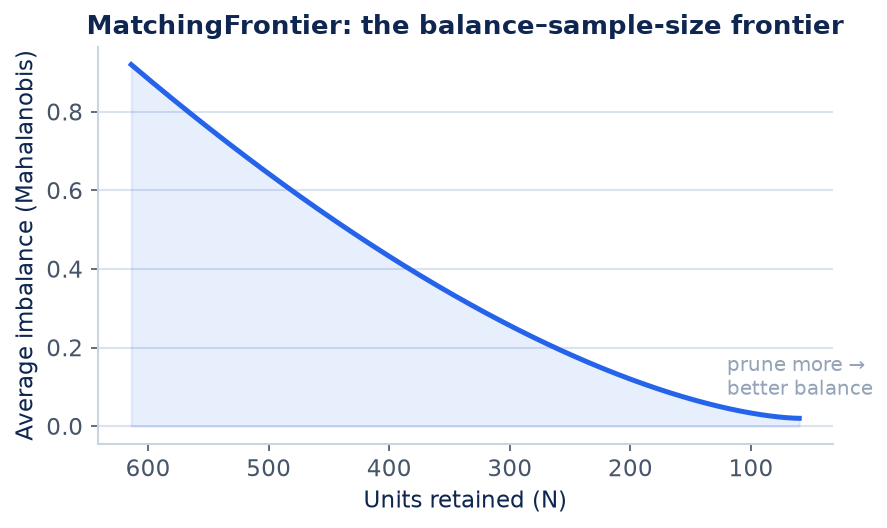
Result figure rendered by StatsOtter from the package's documented example — unofficial community showcase; all credit to the original authors.
The estimate
\text{frontier: }\ \min_{|S|=n}\ \mathrm{Imbalance}(S)\quad\text{for every }n,\ \ \hat\tau(n)=\widehat{\mathrm{ATT}}\big(S^\star(n)\big)
⚠️ Unofficial community showcase of MatchingFrontier (docs). Not affiliated with the authors — all credit to Gary King, Christopher Lucas, Richard Nielsen & Noah Greifer; this summarizes public documentation.
What it does. Matching forces a choice: prune more units for better balance, or keep more for precision. MatchingFrontier computes the entire frontier of that tradeoff at once (King, Lucas & Nielsen 2017), so you can see balance and effect estimates as a function of the sample retained instead of guessing one caliper.
How it works. makeFrontier() orders units so that dropping the next-worst one maximally improves an imbalance metric (e.g. Mahalanobis or L1), producing every nested matched subset from all units down to a few. estimateEffects() then fits the outcome model along the frontier and plot() shows how the estimate moves as you trade sample size for balance.
Assumptions. Unconfoundedness given the covariates and overlap; the frontier characterizes bias–variance, it does not remove unmeasured confounding.
What you get — A nested family of matched samples, an imbalance value and an effect estimate at each point on the balance–N frontier.
Example output
A matching frontier with 614 points.
QOI: FSATT   Metric: dist (Mahalanobis)
N ranges from 614 down to 2 units retained.
Use estimateEffects() and plot() to view the effect along the frontier.
Discuss the workflow (0)
Log in to join the discussion.