
Who responds to treatment? (FindIt)

Follow the analysis.
Select a node to explore the method
Load the data
Data preparation — shapes the raw inputs into what the estimator expects.
Use the Lalonde experiment with the outcome, treatment and covariates whose interactions to search.
# Install:  install.packages("FindIt")
library(FindIt)
data(LaLonde)
set.seed(1)

Before using this step, make its assumptions and its output explicit. A useful peer note explains what you would check, what could go wrong, or what would change your interpretation.
Questions to explore- Which assumption matters most here, and what evidence could challenge it?
- What would you check before passing this output to the next step?
Choose a question to start your comment.
Peer discussion
- Bring your experience, a question, or a different perspective.
Log in to comment on this step.
Search for heterogeneous effects
The core estimate — where the causal quantity itself is computed.
FindIt fits the regularized model with treatment-by-covariate interactions, selecting the penalty by cross-validation.
out <- FindIt(model.treat = re78 ~ treat,
              model.main = ~ age + educ + black + hisp + married,
              model.int  = ~ age + educ + black + hisp + married,
              data = LaLonde, type = "continuous", treat.type = "single")
summary(out)
Before using this step, make its assumptions and its output explicit. A useful peer note explains what you would check, what could go wrong, or what would change your interpretation.
Questions to explore- Which assumption matters most here, and what evidence could challenge it?
- What would you check before passing this output to the next step?
Choose a question to start your comment.
Peer discussion
- Bring your experience, a question, or a different perspective.
Log in to comment on this step.
Inputs & data
Experimental data with a treatment (or factorial/conjoint factors), an outcome, and pre-treatment covariates.
Show data format & exampleHide example
| re78 | treat | age | educ | black | married |
|---|---|---|---|---|---|
| 9.9 | 1 | 37 | 11 | 1 | 1 |
| 3.6 | 0 | 22 | 9 | 1 | 0 |
| 14.2 | 1 | 45 | 16 | 0 | 1 |
| 8.8 | 0 | 29 | 10 | 1 | 0 |
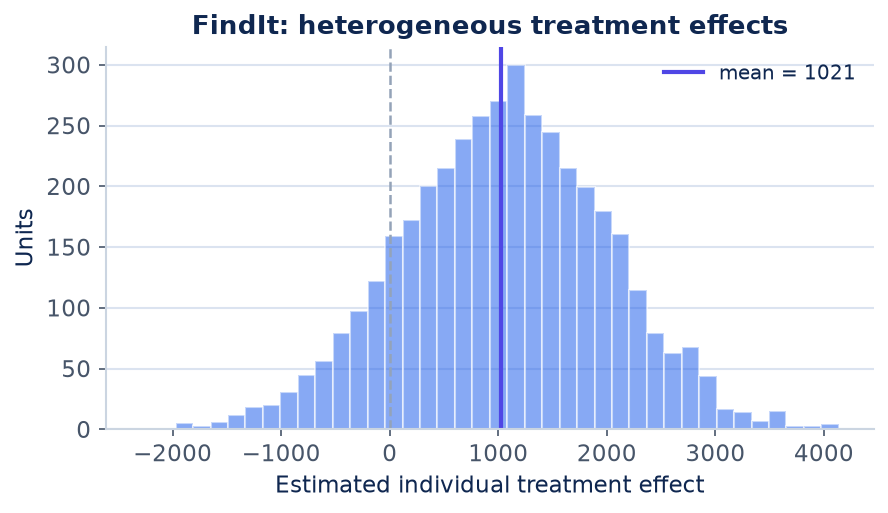
Result figure rendered by StatsOtter from the package's documented example — unofficial community showcase; all credit to the original authors.
The estimate
\hat\tau(x)=\hat\beta^\top x,\quad \hat\beta=\arg\min_\beta |Y-X\beta|^2+\lambda|\beta|_1
⚠️ Unofficial community showcase of FindIt (docs). Not affiliated with the authors — all credit to Naoki Egami, Marc Ratkovic & Kosuke Imai; this summarizes public documentation.
What it does. FindIt implements the Imai–Ratkovic method for heterogeneous treatment effects: it searches over covariates and their interactions with treatment to discover who is helped or hurt, while controlling false discoveries through regularization.
How it works. It fits a Support Vector Machine / LASSO model with treatment–covariate interactions, choosing the penalty by cross-validation so only well-supported interactions survive. predict() returns each unit's estimated treatment effect; the method also handles factorial and conjoint designs (causal interaction among factors).
Assumptions. Randomized (or unconfounded) treatment; the LASSO penalty trades a little bias for far lower variance and guards against overfitting the interactions.
What you get — A per-unit treatment-effect estimate, the selected interaction terms, and the cross-validated penalty.
Example output
FindIt: Finding Heterogeneous Treatment Effects

Treatment effect estimates by subgroup (ATE range):
  Min. 1st Qu. Median  Mean 3rd Qu.  Max.
 -1842    312    948  1021   1693  3204

Number of selected interaction terms: 4
Optimal lambda (LASSO): 0.083
Discuss the workflow (0)
Log in to join the discussion.